A resume is a written document that contains a summary of your work experience including positions held at each employer--and your educational background. The look and design of a resume is often as important as the content, because a well-organized and eye-catching resume is more likely to attract the attention of an employer. Google Drive, aside from being completely free and available on the web, also has resume templates that look great and are easy to fill in.
Step # 1 - Open Google Drive Template Gallery
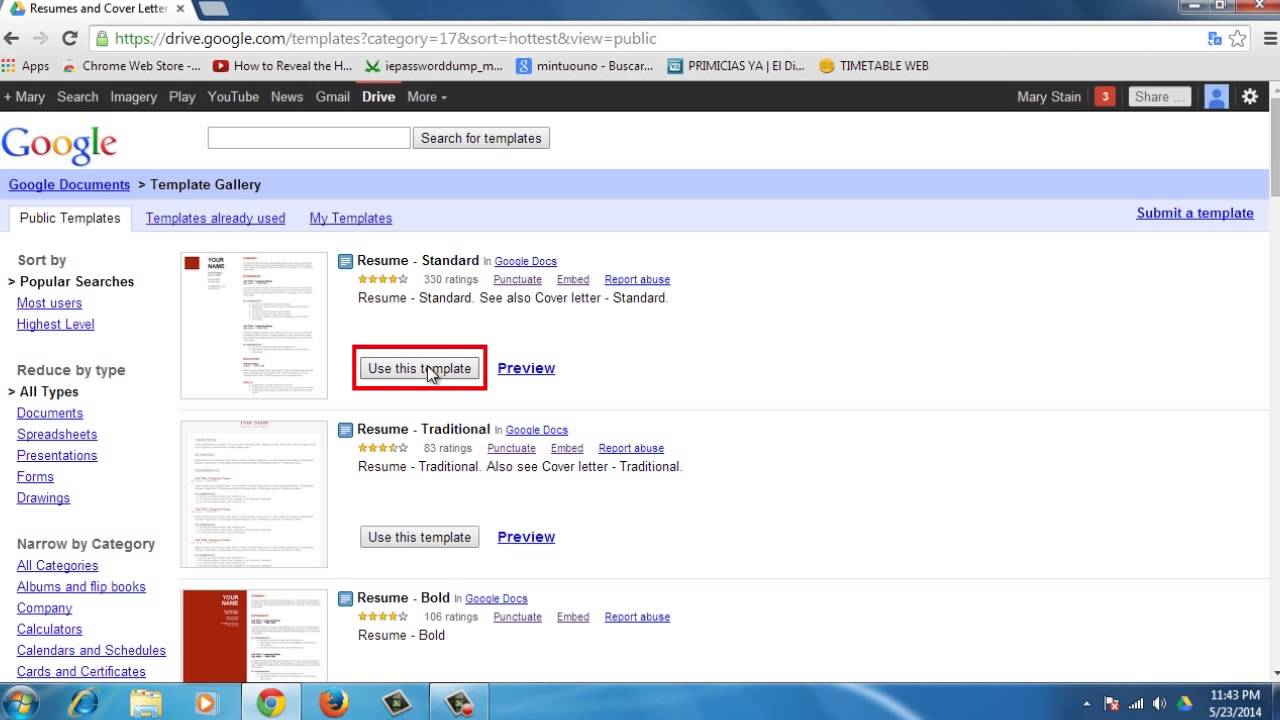
Be sure you are signed into your Google account. Next, open your browser and go to drive. google. com/templates. Youll find a menu in the left side of the website. Go to All categories and choose Resume and cover letters.
Step # 2 - Choose a template
You'll see all of the available resume templates, and you can preview them to find the one that works best for you. Click Use this Template to open it up in a fresh document, and start replacing the placeholder text with your own work experience, name, accomplishments, and so on. You can also create a cover letter following the same steps.
Step # 3 - Download your resume
When you're finished, you can download your resume. Just go to File, Download as, and choose the format you prefer, or just let it autosave until you need to send it out.
Result: Congratulations! Youve just learned how to Create a Resume in Google Drive
Tony: The templates are cool and all but how do you change the color of the red boxes? or get rid of them completely so I can put my logo in? Date: 2023-07-08