Portable Document Format or PDF is a file format used to present documents in a manner independent of application software, hardware, and operating systems. PDFill PDF Tools are FREE PDF functions to merge, split, reorder and reformat PDF pages, and more.
Step # - 1 Download and run PDFill
First, you need to download PDFill. Open your browser and visit www. pdfill. com
Once youre on the website, go to the left menu and click on Free PDF Tools. We recommend you get the entire package. as it has many useful tools. Click on the Download now button on the left. Then click on Download now button. Youll be redirected to another web page. Click once more on Download now. Run the installer and, once done, click Finish.
Step # 2 - Merge Multiple PDF files into one file
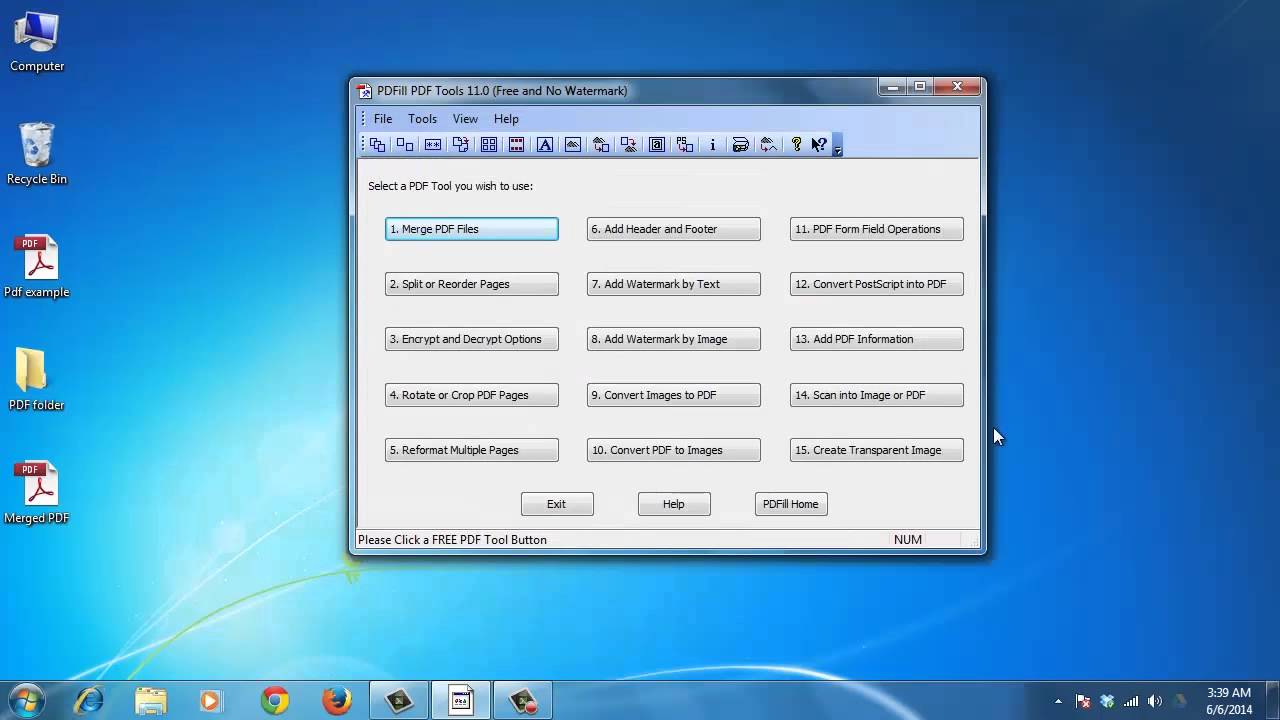
To merge pdf files into one file, open the program. Click on Merge PDF Files. The Merge PDF Files dialog box will come up. Click Add a PDF File to add PDF files that you wish to merge into a new PDF file. Each files name, total pages and location are displayed.
You can add the same file more than once. You also have the option named Add PDF Files under a folder to select a folder and all the PDFs inside it.
To remove a file from the file list, select the filename and click Remove. When you have added all the files to be merged and have the files in the desired sequence, click Save As, for a new PDF file. Then click Close to finish.
Step # 3 Split, Reorder or Delete PDF Pages
To split a PDF file choose Split, Reorder, or Delete PDF Pages. Then select a PDF that you want to split. The Split, Reorder, or Delete PDF Pages dialog box will come up. To split pages, click Split Pages. Specify the range of pages to split. You can also explore the options to reorder and delete pages, among others. Click Save As for a new PDF file. Click Close to finish.
Step # 4 Paginate PDF Files
To paginate a PDF file go to the Header and Footer option.
In this option you can add header and footer information that is used to present information, such as page numbers, or the title of the document, in the top or bottom margins of a document.
To change the content of a header or footer, click to select or unselect Add Header or Add Footer. Click Show Page Number to show numbers on each page. Enter the text information such as date, time, or the title of the document, before or after the number. You can also enter the text before or after the page number. When youre finished, click on Save as. Choose a location, click Save, and then Close.
There are many other options that you can explore. PDFill is a really complete and useful tool.
Result: Congratulations! Youve just learned How to Split, Merge and Paginate PDF Files (Windows Date: 2023-07-08