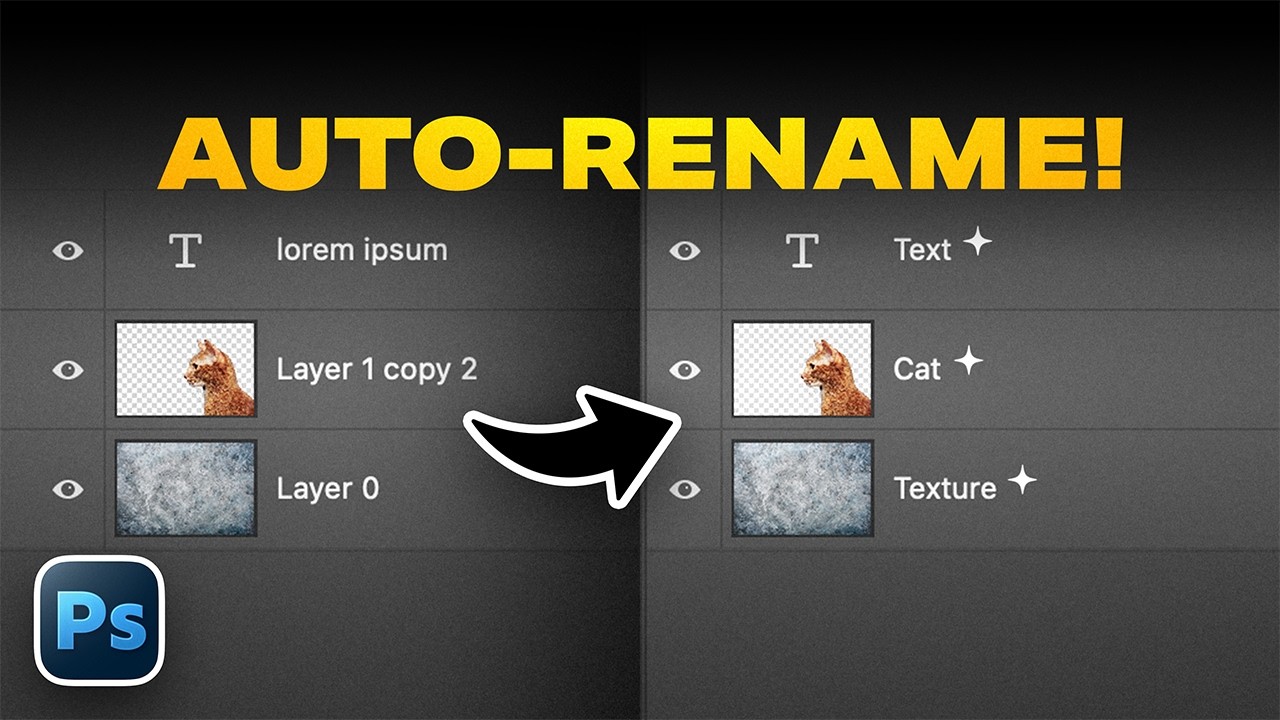
NEW Photoshop Feature: Auto-Rename Messy Layers!
video description
Date: 2026-04-12
Related videos


Comments and reviews: 13
cmptrman
Ugh...seriously Adobe All the bugs and features you COULD be doing and you choose to do this!! They need to stop worrying about breaking backward compatibility with their PSD files and actually INNOVATE again. Everything they come up with over the last several years is only sub-par and they rely on relationships with 3rd parties to provide functionality as plugins. It's like they've realized that there's more money to be made by catering to the influencers and hobbyists than actual professionals. Meanwhile, features that USED to work really good are breaking. For example, I can't use Select and Mask anymore on my 100MP medium format files--in fact, a LOT of Adobe stuff breaks at that resolution. I know you like them Unmesh but, in my opinion, Adobe hasn't cared about being industry leaders for many years now. If there was a viable alternative that gave me the same professional results, I'd jump ship in a heartbeat.
reply
Ugh...seriously Adobe All the bugs and features you COULD be doing and you choose to do this!! They need to stop worrying about breaking backward compatibility with their PSD files and actually INNOVATE again. Everything they come up with over the last several years is only sub-par and they rely on relationships with 3rd parties to provide functionality as plugins. It's like they've realized that there's more money to be made by catering to the influencers and hobbyists than actual professionals. Meanwhile, features that USED to work really good are breaking. For example, I can't use Select and Mask anymore on my 100MP medium format files--in fact, a LOT of Adobe stuff breaks at that resolution. I know you like them Unmesh but, in my opinion, Adobe hasn't cared about being industry leaders for many years now. If there was a viable alternative that gave me the same professional results, I'd jump ship in a heartbeat.
reply
annaconsta
Thank you for always updating us on what is/will be new!
Could you please make a tutorial on how to solve the Unable to reach Adobe servers error in Creative Cloud :(((((( I am having this error for a week, I won't be able to download the updates I actually pay for... Is anyone else having this issue
I tried everything: cleaning the host files, doing some commands in cmd run as administrator, running the Adobe Limited Access Repair Tool, running the Adobe Cleaner tool, making sure my PC date and time are in synch, turning off firewall...
I am beginning to get very angry at Adobe, it lasts for a week, and they increased their price last year... You are in contact with Adobe, could you please PLEASE forward my message to them
You are the best, thank you so much!
reply
Thank you for always updating us on what is/will be new!
Could you please make a tutorial on how to solve the Unable to reach Adobe servers error in Creative Cloud :(((((( I am having this error for a week, I won't be able to download the updates I actually pay for... Is anyone else having this issue
I tried everything: cleaning the host files, doing some commands in cmd run as administrator, running the Adobe Limited Access Repair Tool, running the Adobe Cleaner tool, making sure my PC date and time are in synch, turning off firewall...
I am beginning to get very angry at Adobe, it lasts for a week, and they increased their price last year... You are in contact with Adobe, could you please PLEASE forward my message to them
You are the best, thank you so much!
reply
PeJota615
The fact that this requires an internet connection, like so many features on many programs nowadays, really annoys me. We need more local features, not more always online features. The problem is that this feature requires Photoshop to look at the image and try to recognize all the components. For that alone it seems like it's resource intensive.
I do like the feature in theory. But only because occasionally I receive projects where the original creator didn't bother renaming layers, so at least this could help me sort through the layers before I manually rename them to what I really want. But when it comes to my personal projects, I'm very diligent about renaming all my layers as I work on them so I don't see myself using this much if at all.
reply
The fact that this requires an internet connection, like so many features on many programs nowadays, really annoys me. We need more local features, not more always online features. The problem is that this feature requires Photoshop to look at the image and try to recognize all the components. For that alone it seems like it's resource intensive.
I do like the feature in theory. But only because occasionally I receive projects where the original creator didn't bother renaming layers, so at least this could help me sort through the layers before I manually rename them to what I really want. But when it comes to my personal projects, I'm very diligent about renaming all my layers as I work on them so I don't see myself using this much if at all.
reply
xperstudios
The perfect version of this imo, it's if they were able to quantize the recognition model so we can use it locally. Otherwise, this feature doesn't make sense. If Adobe gifts their server usage for people with 100 layers pressing the button multiple times, it doesn't make sense for them. And if you consume like 10 credits just for organizing your layers because you're lazy, then it doesn't make sense still.
reply
The perfect version of this imo, it's if they were able to quantize the recognition model so we can use it locally. Otherwise, this feature doesn't make sense. If Adobe gifts their server usage for people with 100 layers pressing the button multiple times, it doesn't make sense for them. And if you consume like 10 credits just for organizing your layers because you're lazy, then it doesn't make sense still.
reply
murtileyto
Random file/layer names and AI-generated names are both hard to understand and navigate for me. Neither option compares to manually renaming layers, because when you name them yourself, you choose clear, meaningful labels that make sense to you later. For you, by you.
reply
Random file/layer names and AI-generated names are both hard to understand and navigate for me. Neither option compares to manually renaming layers, because when you name them yourself, you choose clear, meaningful labels that make sense to you later. For you, by you.
reply
jwlandfair
This is actually...amazing I was literally just working and reworking a few images for a client and there were so many variations, everything was just a cluster cuss. About a fourth of my time was just remembering the purpose of each one of the layers. It was a pain.
reply
This is actually...amazing I was literally just working and reworking a few images for a client and there were so many variations, everything was just a cluster cuss. About a fourth of my time was just remembering the purpose of each one of the layers. It was a pain.
reply
AleWebCreate
The feature is cool, no doubt. But still not complete 100% as you showed. The will improve in the future, I'm sure.
But I hope there will be no credits consumed, it would be really annoying, especially when you pay 79/month to Adobe
reply
The feature is cool, no doubt. But still not complete 100% as you showed. The will improve in the future, I'm sure.
But I hope there will be no credits consumed, it would be really annoying, especially when you pay 79/month to Adobe
reply
TanChoonHong
Once more Adobe has got ahead of itself. Like the Auto-Alt Text generation with AI feature when you place an image into InDesgn that spews out irrelevant text purporting to explain the placed or linked image.
reply
Once more Adobe has got ahead of itself. Like the Auto-Alt Text generation with AI feature when you place an image into InDesgn that spews out irrelevant text purporting to explain the placed or linked image.
reply
supergolfdude
Well, it’s a good start. I mean, I don’t know that a lot of people were asking for this, but it would be kind of convenient. Also, I would never pay for it with credits if it came to that.
reply
Well, it’s a good start. I mean, I don’t know that a lot of people were asking for this, but it would be kind of convenient. Also, I would never pay for it with credits if it came to that.
reply
minardians
Still needs more tweaking, though with this feature, it can shorten the time needed to renaming layers one by one.
We'll need more options to rename layers based on groups, color, etc.
reply
Still needs more tweaking, though with this feature, it can shorten the time needed to renaming layers one by one.
We'll need more options to rename layers based on groups, color, etc.
reply
waendi14
When I started working with layers (years ago...) I always named the layers and I'm used to do it automatically. So for me, I think I'm not using this new feature.
reply
When I started working with layers (years ago...) I always named the layers and I'm used to do it automatically. So for me, I think I'm not using this new feature.
reply
FernayaKoriIIio
This feature makes sense if you have hundreds and hundreds of layers and you didn’t re-organise them but if you have 2 or 3 layers you won’t need it.
reply
This feature makes sense if you have hundreds and hundreds of layers and you didn’t re-organise them but if you have 2 or 3 layers you won’t need it.
reply
PremiereEditHub
Sir, I am Ibrahim, Can You Continue Whihc is Start a New Course. and Your Speaking is Vary Nice, and I am Ibrahim also I am Afghan
reply
Sir, I am Ibrahim, Can You Continue Whihc is Start a New Course. and Your Speaking is Vary Nice, and I am Ibrahim also I am Afghan
reply
Add a review, comment
Other channel videos