VehiclesFashionRecipesBlogsHuntTravelsSportFunHandmadeITEducation
Mini-Games
x

x
zakruti.com » IT - Software » Geeks Tutorial
How to Format Date and Time Values in Access

How to Format Date and Time Values in Access

FBTwitterReddit

video description

Rating: 4.0; Vote: 1
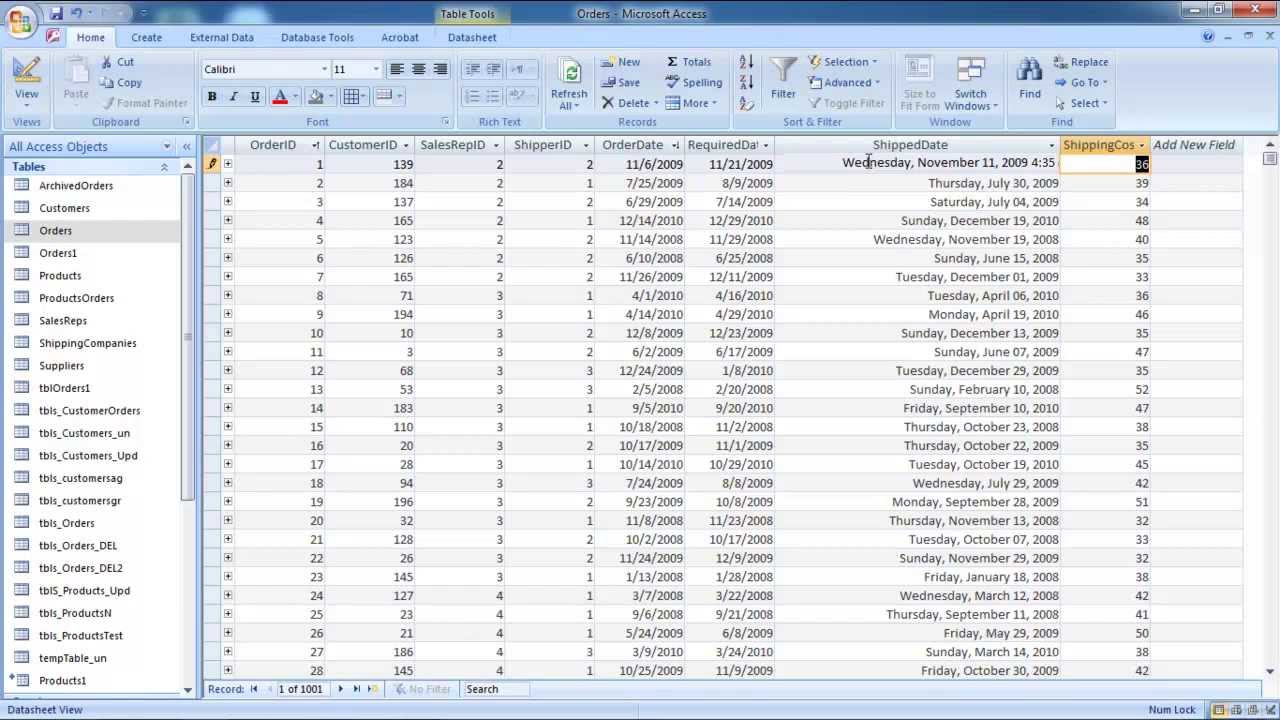
we will teach you how to format date values in Access. Learn how to change the format of a field which has date/time as its data type. Learn how to change the format of such a field. We will also teach you how to format time in Access. For the purpose of this tutorial, we will change the format of some field which has date/time as its data type. Step 1 -- Design View For the purpose of this tutorial, we will be using an existing database. Open any table in the database that contains a date field. Once the table has opened up and you have seen the date field, click on the view drop down button and select the design view option. Step 2 -- Change format As a result, the table will open in design view. For the purpose of this tutorial, we will be changing the format of the date field. You will notice that the data type for the field is date/time. Click over here and then change the format under the field properties section. Change the format of the field to general date. This format shows the date first followed by the time as well. Step 3 -- Enter date and time Now go to the top left corner of the screen and click on the view button. You will be prompted to save the changes before you exit the design view. Click on the yes button to save the changes. You will come back to the table opened in datasheet view. Now go to the field whose data type format you just changed. Type in the date followed by the time as per the format and you will see that the field displays the date and time both, just as you wanted. In this manner, you can format date and time in Access
Date: 2023-07-08

Comments and reviews: 3


Sir I have benefitted greatly by watching your videos. But I have encountered a problem. If you give a suggestion to cooperate then I would be much better off. The problem is that I show the time of entry of MS Access's entry form, such as /. /
reply

This would be a lot more helpful if your advertisements didn't cover the screen making it difficult to see what's happening underneath. =/
reply

how to validate form so that required date can not be entered less than ordered date in above example
reply
Add a review, comment


Other channel videos