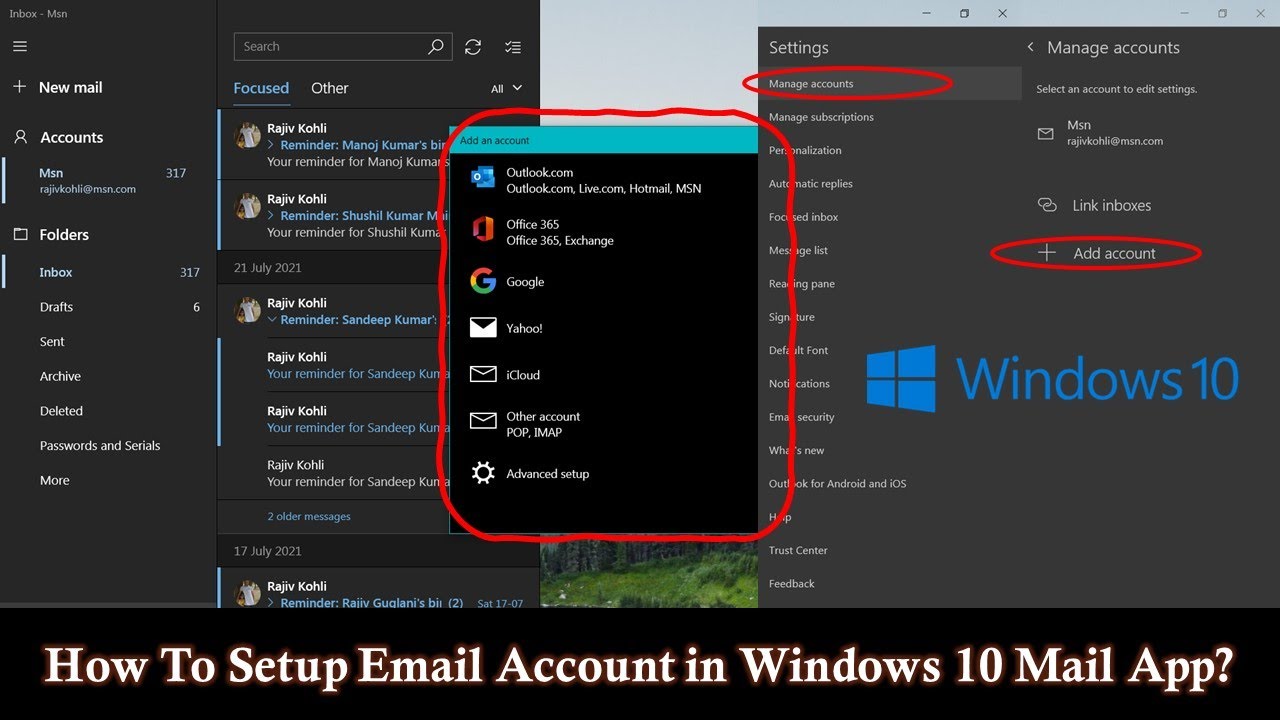
How To Add or Remove Email Accounts in Windows 10 Mail The Teacher
video description
Date: 2022-03-31
Related videos


Comments and reviews: 8
jrmccraney
Your tutorial is for Windows 10 and I am using Windows 10, but my Microsoft Account page looks completely different than the one shown in your app. I made a huge mistake using my Microsoft account as the login for my computer. I have connected two different email accounts to access my microsoft account. I wanted to remove one of those, but it is totally impossible because whenever I try to do anything, change any setting, remove an additional email account I connected I CAN NOT because only the Windows Administrator User can make any changes and I have forgotten that password and there is no way to recover it. I have spent at the very least, a total of 24 hours, trying to recover that password, remove that email account from my Microsoft account and I come full circle back to -CAN'T DO ANYTHING WITHOUT THE ADMINISTRATOR USER ACCOUNT-. If I am willing to pay $99.99 Windows or HP will gladly help me correct this problem. I spent a great amount of money to purchase my HP Pavilion 17- screen Laptop which came with Windows 10 already installed. There were NO Laptops or Desktops available that did not have Windows 10 already installed. I thought nothing of it. I'd figured out how to use Windows 8, which everyone hated, so I thought, no problem, I can figure out Windows 10. I did, except for one grave mistake I made by using Microsoft as my login (to get into my computer) and then I compounded the problem my linking a second email account to Microsoft (I can't sign into Windows/my computer with that account) and now I can not even unlink it or remove it from my Microsoft account. I really believed your tutorial on removing a second account, or unwanted account from Microsoft was going to work. It did not, back to the same problem.....everything hinges on knowing the password for the administrator user account. The funny thing is, I can sign into that account to access my microsoft account, but that's where it ends. Seems I am out of luck and I refuse to pay $100 to resolve a problem that is such an egregious mistake made by the developers of Windows 10 in which they made it IMPOSSIBLE for the user to recover there password. This is the one and only time I have ever come across any applications that didn't have a way to recover or reset your password. It seems it is a HUGE SCAM to get another $100 from us. Such greedy -----ds. I have always used Windows, over two decades, but now APPLE is looking pretty good.
reply
Your tutorial is for Windows 10 and I am using Windows 10, but my Microsoft Account page looks completely different than the one shown in your app. I made a huge mistake using my Microsoft account as the login for my computer. I have connected two different email accounts to access my microsoft account. I wanted to remove one of those, but it is totally impossible because whenever I try to do anything, change any setting, remove an additional email account I connected I CAN NOT because only the Windows Administrator User can make any changes and I have forgotten that password and there is no way to recover it. I have spent at the very least, a total of 24 hours, trying to recover that password, remove that email account from my Microsoft account and I come full circle back to -CAN'T DO ANYTHING WITHOUT THE ADMINISTRATOR USER ACCOUNT-. If I am willing to pay $99.99 Windows or HP will gladly help me correct this problem. I spent a great amount of money to purchase my HP Pavilion 17- screen Laptop which came with Windows 10 already installed. There were NO Laptops or Desktops available that did not have Windows 10 already installed. I thought nothing of it. I'd figured out how to use Windows 8, which everyone hated, so I thought, no problem, I can figure out Windows 10. I did, except for one grave mistake I made by using Microsoft as my login (to get into my computer) and then I compounded the problem my linking a second email account to Microsoft (I can't sign into Windows/my computer with that account) and now I can not even unlink it or remove it from my Microsoft account. I really believed your tutorial on removing a second account, or unwanted account from Microsoft was going to work. It did not, back to the same problem.....everything hinges on knowing the password for the administrator user account. The funny thing is, I can sign into that account to access my microsoft account, but that's where it ends. Seems I am out of luck and I refuse to pay $100 to resolve a problem that is such an egregious mistake made by the developers of Windows 10 in which they made it IMPOSSIBLE for the user to recover there password. This is the one and only time I have ever come across any applications that didn't have a way to recover or reset your password. It seems it is a HUGE SCAM to get another $100 from us. Such greedy -----ds. I have always used Windows, over two decades, but now APPLE is looking pretty good.
reply
Daniel
My account that I am using to log into windows is the same main email account for Windows 10. The email is not syncing at all, ever. Just suddenly stopped working. When I go to -settings- > -accounts- and select the main account the option that says -change mailbox sync settings- is completely disabled for me.. I cannot even select it to access it and attempt to change these settings. How can I fix this problem?? Can anyone help?
reply
My account that I am using to log into windows is the same main email account for Windows 10. The email is not syncing at all, ever. Just suddenly stopped working. When I go to -settings- > -accounts- and select the main account the option that says -change mailbox sync settings- is completely disabled for me.. I cannot even select it to access it and attempt to change these settings. How can I fix this problem?? Can anyone help?
reply
Ann
Hello, I'm also trying to removed a Microsoft email account from my laptop. My husband was working from home using his Microsoft email account and now I can't access to my outlook account how can I removed his account from his work? When I go to settings then accounts then email & accounts I see his work account but it doesn't give me a delete option so I have no idea how to remove it.
reply
Hello, I'm also trying to removed a Microsoft email account from my laptop. My husband was working from home using his Microsoft email account and now I can't access to my outlook account how can I removed his account from his work? When I go to settings then accounts then email & accounts I see his work account but it doesn't give me a delete option so I have no idea how to remove it.
reply
Mighty
I don't want ANY of my accounts linked!!! None. No video explains how to remove EVERYTHING!!! It's all self explanatory shit that we should already know. I want to remove my damn email so nothing is linked and i cannot do it!
reply
I don't want ANY of my accounts linked!!! None. No video explains how to remove EVERYTHING!!! It's all self explanatory shit that we should already know. I want to remove my damn email so nothing is linked and i cannot do it!
reply
Chris
Whenever I try to add s Google account, I put in my information and allow access, but then it does not create the account. It just stays on a white screen that says, -Connecting to a service.- Any advice or help?
reply
Whenever I try to add s Google account, I put in my information and allow access, but then it does not create the account. It just stays on a white screen that says, -Connecting to a service.- Any advice or help?
reply
FlipFilms-Jack
mine doesn't have a delete account button it just says change mailbox sync settings and below that it says change account settings, no delete, please help
reply
mine doesn't have a delete account button it just says change mailbox sync settings and below that it says change account settings, no delete, please help
reply
Elias
Hi sir, by doing what you just did, does it automatically delete all the emails associated with the deleted account within the storage folder ?!
reply
Hi sir, by doing what you just did, does it automatically delete all the emails associated with the deleted account within the storage folder ?!
reply
Joshua
I accidentally made an account on my windows 10 just to download a game now I want to delete it from the welcome screen please help
reply
I accidentally made an account on my windows 10 just to download a game now I want to delete it from the welcome screen please help
reply
Add a review, comment
Other channel videos