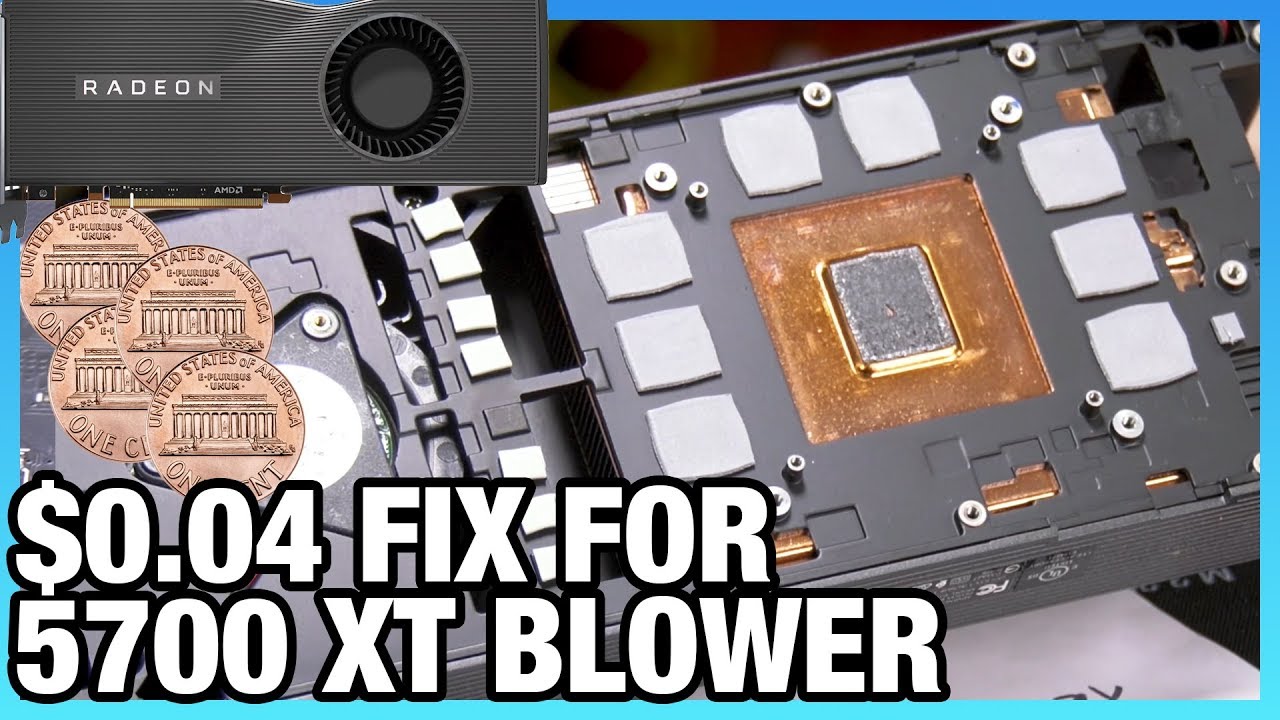
Fixing the RX 5700 XT Cooler for 0. 04 Paste & Washers vs. Thermal Pad
video description
Date: 2020-05-06
Related videos





Comments and reviews: 12
Elliott
Ok, I've done this mod also like another chap in the comments. I used thermal grisly kryonaut, 1mm thick silicone thermal pads and some plastic washers. With the washers, I made sure the hole was big enough for the small post that pokes through the pcb to fit within, and also kept the springs on. So order is screw, bracket, washer, spring. The spring also fits inside the washer. I also put 4 1mm thick strips of plasticard under the four rubber feet around the center of the mounting bracket (1 strip on each rubber foot, to increase the pressure at the center. Then did an auto undervolt in wattman and now I site at 2020mhz over prolonged furmark 1080p runs, getting to a junction temp of about 86 after saturation. Clock may dip a bit on saturation, but still above 1900.
reply
Ok, I've done this mod also like another chap in the comments. I used thermal grisly kryonaut, 1mm thick silicone thermal pads and some plastic washers. With the washers, I made sure the hole was big enough for the small post that pokes through the pcb to fit within, and also kept the springs on. So order is screw, bracket, washer, spring. The spring also fits inside the washer. I also put 4 1mm thick strips of plasticard under the four rubber feet around the center of the mounting bracket (1 strip on each rubber foot, to increase the pressure at the center. Then did an auto undervolt in wattman and now I site at 2020mhz over prolonged furmark 1080p runs, getting to a junction temp of about 86 after saturation. Clock may dip a bit on saturation, but still above 1900.
reply
Vahn
I'm seriously considering doing the washer/paste mod to my 5700xt Anniversary just to see what it can do, but I'm leery to mess with it and void my warranty on something so new. I got really lucky with my card and its maxing at 81C under torture tests, 2020Mhz clock speed and 75% fan, and doesn't seem loud. I don't even have Wattman enabled and haven't made any changes to the card or its software whatsoever. It's worth noting that my friend has a sapphire pulse model card and I tried it in my system, and my blower style card got better thermals and higher clocks, perhaps because of my mini-itx case? I haven't tried my card in his giant computer to compare.
reply
I'm seriously considering doing the washer/paste mod to my 5700xt Anniversary just to see what it can do, but I'm leery to mess with it and void my warranty on something so new. I got really lucky with my card and its maxing at 81C under torture tests, 2020Mhz clock speed and 75% fan, and doesn't seem loud. I don't even have Wattman enabled and haven't made any changes to the card or its software whatsoever. It's worth noting that my friend has a sapphire pulse model card and I tried it in my system, and my blower style card got better thermals and higher clocks, perhaps because of my mini-itx case? I haven't tried my card in his giant computer to compare.
reply
olo → Vahn
Fixing the cooler on an AMD Radeon RX 5700 XT graphics card can be necessary if you're experiencing overheating issues, loud fan noises, or other cooling-related problems. Here's a general guide on how to address these issues:
Important Note: Before attempting any repairs or modifications to your graphics card, make sure your warranty isn't voided by such actions. If your card is still under warranty, consider contacting the manufacturer or seller for assistance first.
1. Cleaning the Cooler:
Over time, dust and debris can accumulate in the cooler, reducing its efficiency. Start by turning off your PC and unplugging the power supply.
Open your computer case and carefully remove the RX 5700 XT graphics card.
Gently clean the heatsink and fans using compressed air or a soft brush to remove any dust or dirt. Pay special attention to the heatsink fins, as clogged fins can hinder heat dissipation.
Be cautious not to damage any components during the cleaning process.
2. Reapplying Thermal Paste:
If the thermal paste on the GPU has degraded or dried out, you may need to reapply it. This can help improve thermal conductivity between the GPU and the heatsink.
Carefully remove the cooler from the graphics card, following the manufacturer's instructions. This often involves removing screws or clips.
Clean the old thermal paste from both the GPU and the heatsink using a soft cloth or isopropyl alcohol.
Apply a small, pea-sized amount of high-quality thermal paste (e.g., Arctic Silver 5) to the GPU.
Reattach the cooler, ensuring that it's secured properly.
3. Fan Replacement:
If the fans on your RX 5700 XT are malfunctioning or making excessive noise, you may need to replace them.
Identify the correct replacement fans for your graphics card model. You can find compatible fans online or contact the manufacturer's customer support.
Carefully remove the old fans from the graphics card by disconnecting their cables and removing any screws or clips.
Install the new fans, reconnect their cables, and secure them in place.
Test the card to ensure the new fans are functioning correctly.
4. Upgrading the Cooler (Optional):
Some users choose to upgrade the cooler on their graphics card to a third-party solution for better cooling performance and reduced noise.
Before attempting this, ensure that the new cooler is compatible with your RX 5700 XT model.
Follow the installation instructions provided with the new cooler. This typically involves removing the stock cooler, attaching new brackets or mounting hardware, and securing the new cooler in place.
5. Monitor Temperatures:
After making any changes, use monitoring software (e.g., MSI Afterburner) to check your graphics card's temperature while running demanding tasks or games. Ensure that the temperatures are within safe limits.
Remember that modifying your graphics card can void its warranty, so proceed with caution and consider seeking professional help if you're not comfortable performing these tasks yourself. Additionally, ensure proper grounding and static protection when working with sensitive electronic components.
reply
Fixing the cooler on an AMD Radeon RX 5700 XT graphics card can be necessary if you're experiencing overheating issues, loud fan noises, or other cooling-related problems. Here's a general guide on how to address these issues:
Important Note: Before attempting any repairs or modifications to your graphics card, make sure your warranty isn't voided by such actions. If your card is still under warranty, consider contacting the manufacturer or seller for assistance first.
1. Cleaning the Cooler:
Over time, dust and debris can accumulate in the cooler, reducing its efficiency. Start by turning off your PC and unplugging the power supply.
Open your computer case and carefully remove the RX 5700 XT graphics card.
Gently clean the heatsink and fans using compressed air or a soft brush to remove any dust or dirt. Pay special attention to the heatsink fins, as clogged fins can hinder heat dissipation.
Be cautious not to damage any components during the cleaning process.
2. Reapplying Thermal Paste:
If the thermal paste on the GPU has degraded or dried out, you may need to reapply it. This can help improve thermal conductivity between the GPU and the heatsink.
Carefully remove the cooler from the graphics card, following the manufacturer's instructions. This often involves removing screws or clips.
Clean the old thermal paste from both the GPU and the heatsink using a soft cloth or isopropyl alcohol.
Apply a small, pea-sized amount of high-quality thermal paste (e.g., Arctic Silver 5) to the GPU.
Reattach the cooler, ensuring that it's secured properly.
3. Fan Replacement:
If the fans on your RX 5700 XT are malfunctioning or making excessive noise, you may need to replace them.
Identify the correct replacement fans for your graphics card model. You can find compatible fans online or contact the manufacturer's customer support.
Carefully remove the old fans from the graphics card by disconnecting their cables and removing any screws or clips.
Install the new fans, reconnect their cables, and secure them in place.
Test the card to ensure the new fans are functioning correctly.
4. Upgrading the Cooler (Optional):
Some users choose to upgrade the cooler on their graphics card to a third-party solution for better cooling performance and reduced noise.
Before attempting this, ensure that the new cooler is compatible with your RX 5700 XT model.
Follow the installation instructions provided with the new cooler. This typically involves removing the stock cooler, attaching new brackets or mounting hardware, and securing the new cooler in place.
5. Monitor Temperatures:
After making any changes, use monitoring software (e.g., MSI Afterburner) to check your graphics card's temperature while running demanding tasks or games. Ensure that the temperatures are within safe limits.
Remember that modifying your graphics card can void its warranty, so proceed with caution and consider seeking professional help if you're not comfortable performing these tasks yourself. Additionally, ensure proper grounding and static protection when working with sensitive electronic components.
reply
gxmcdg
Help me getting this straight: I wont need the thermal pads if I only add the washers to the screws? Did anyone do that? Does it improves the temperatures as drastically as with the thermal paste and pads changes? My concerns are about being forced to change the thermal pads once I disassemble the VGA completely, because I have 0 trust-able thermal pads brands here at the local market. By the way, can you guys write down good brands of thermal paste for the job? I didn't get very well what he said about the ones that ages well and the ones that does not, and I also doesn't have access to many different (and decent) models here where I live. thanks.
reply
Help me getting this straight: I wont need the thermal pads if I only add the washers to the screws? Did anyone do that? Does it improves the temperatures as drastically as with the thermal paste and pads changes? My concerns are about being forced to change the thermal pads once I disassemble the VGA completely, because I have 0 trust-able thermal pads brands here at the local market. By the way, can you guys write down good brands of thermal paste for the job? I didn't get very well what he said about the ones that ages well and the ones that does not, and I also doesn't have access to many different (and decent) models here where I live. thanks.
reply
sky
Amd management is so dumb that they waste every opportunity they get, new GPU that can finally match nvidia performance but designed a poor blower style casing, now it results in hot GPU that no one wants to buy. Not just me but it seems every one is saying for custom cards with 2 or 3 fan design that can keep the GPU cooler. If Amd had 2 fan design on rx5700xt it would have sold out by now and would have been better buy than rtx2070super. Nvidia would have no chance selling any cards other than rtx2080 super. I have seen rx5700xt over clocks to 2200 MHz easily, wonder what water cooling can do. Just Dumb Amd management screwing up again, sigh.
reply
Amd management is so dumb that they waste every opportunity they get, new GPU that can finally match nvidia performance but designed a poor blower style casing, now it results in hot GPU that no one wants to buy. Not just me but it seems every one is saying for custom cards with 2 or 3 fan design that can keep the GPU cooler. If Amd had 2 fan design on rx5700xt it would have sold out by now and would have been better buy than rtx2070super. Nvidia would have no chance selling any cards other than rtx2080 super. I have seen rx5700xt over clocks to 2200 MHz easily, wonder what water cooling can do. Just Dumb Amd management screwing up again, sigh.
reply
Geshtal205
I did this mod on my non XT 5700 and I saw a drastic difference in thermals. Stock temps when running Time Spy stress test for about 10 minutes were 82C with a 93C junction. After doing the washer mod my temps dropped to 73C/85C. In my case my thermal pad appeared to have not been installed properly as about 2mm of the pad was laying off to the side of the coldplate. I took it off, wiped everything clean and installed a nice bead of Arctic MX-4 thermal paste. Now I'm debating doing the XT bios mod to increase performance a little bit.
reply
I did this mod on my non XT 5700 and I saw a drastic difference in thermals. Stock temps when running Time Spy stress test for about 10 minutes were 82C with a 93C junction. After doing the washer mod my temps dropped to 73C/85C. In my case my thermal pad appeared to have not been installed properly as about 2mm of the pad was laying off to the side of the coldplate. I took it off, wiped everything clean and installed a nice bead of Arctic MX-4 thermal paste. Now I'm debating doing the XT bios mod to increase performance a little bit.
reply
gxmcdg
Guys, help me getting things straight. Will my Reference 5700XT start lowering its GPU core in order to keep a temperature under a X value? I ask that because I forced the VGA fan speed to 100% to ensure the lowest possible temperature and saw no changes at all in the benchs (I actually didnt see much difference between the max clock with the FAN working at default [tend to use 40% of its capacity] and with the fan working at 100% of its capacity [temperature dropped a lot, some 15 degrees from 92C to 78C but no performance boost at all].
reply
Guys, help me getting things straight. Will my Reference 5700XT start lowering its GPU core in order to keep a temperature under a X value? I ask that because I forced the VGA fan speed to 100% to ensure the lowest possible temperature and saw no changes at all in the benchs (I actually didnt see much difference between the max clock with the FAN working at default [tend to use 40% of its capacity] and with the fan working at 100% of its capacity [temperature dropped a lot, some 15 degrees from 92C to 78C but no performance boost at all].
reply
Atheist
The XT is a great card for the price, you're basically getting the same performance as the 2070S but for 200 less (here in Canada. Too bad AMD didn't fix the thermals and noise issue but I think I could probably live with it once the partner cards are out and hopefully they fix or reduce these issues. I've heard the XT might have some driver issues with some software, so long as it's ok I think I'll go with the XT as I want to help AMD become a better company and be a true competition to Nvidia as it is to Intel now.
reply
The XT is a great card for the price, you're basically getting the same performance as the 2070S but for 200 less (here in Canada. Too bad AMD didn't fix the thermals and noise issue but I think I could probably live with it once the partner cards are out and hopefully they fix or reduce these issues. I've heard the XT might have some driver issues with some software, so long as it's ok I think I'll go with the XT as I want to help AMD become a better company and be a true competition to Nvidia as it is to Intel now.
reply
Guest
i did it with, of course, kryonaut and washers. but it looks like the same results. maybe. yes, there was thermal pad and cracks when i disassemble the card. my results after the mod are almost the same i think. 84 celsius and 106Tjmax at 2395rpm. with 100% torture test msi kombustor. blower is little bit noisy but it is ok. higher rpms are much louder. one thing is that temp is lowering down much faster. and there is few more screws on the card but thats all. easy mod.
reply
i did it with, of course, kryonaut and washers. but it looks like the same results. maybe. yes, there was thermal pad and cracks when i disassemble the card. my results after the mod are almost the same i think. 84 celsius and 106Tjmax at 2395rpm. with 100% torture test msi kombustor. blower is little bit noisy but it is ok. higher rpms are much louder. one thing is that temp is lowering down much faster. and there is few more screws on the card but thats all. easy mod.
reply
Duracellmumus
Using washers is not time-proof solution because they push the pcb far from the GPU center point. The original solution is push the PCB at back of GPU. The diffrence is the original state not deforming PCB and get crack the BGA balls below the GPU when the termal solution is do ther own thermal cycle. The most of aftermarket cooler can kill mutch sooner the VGA cards because this flaw. Please do not use this washers to force the thermal solution to GPU.
reply
Using washers is not time-proof solution because they push the pcb far from the GPU center point. The original solution is push the PCB at back of GPU. The diffrence is the original state not deforming PCB and get crack the BGA balls below the GPU when the termal solution is do ther own thermal cycle. The most of aftermarket cooler can kill mutch sooner the VGA cards because this flaw. Please do not use this washers to force the thermal solution to GPU.
reply
Praetorian
This is basically why you should never buy a stock card, just buy like a tested, cooled, or tweaked version from an aftermarket seller (such as EVGA, MSI etc. If you're worried about it, they probably fixed it or improved it already. Many times people don't even buy the original card direct from the company, unless they are just a tester, reviewer, etc. and you get basically free cooling, stable OC, or other features from the secondhand seller.
reply
This is basically why you should never buy a stock card, just buy like a tested, cooled, or tweaked version from an aftermarket seller (such as EVGA, MSI etc. If you're worried about it, they probably fixed it or improved it already. Many times people don't even buy the original card direct from the company, unless they are just a tester, reviewer, etc. and you get basically free cooling, stable OC, or other features from the secondhand seller.
reply
Add a review, comment
Other channel videos