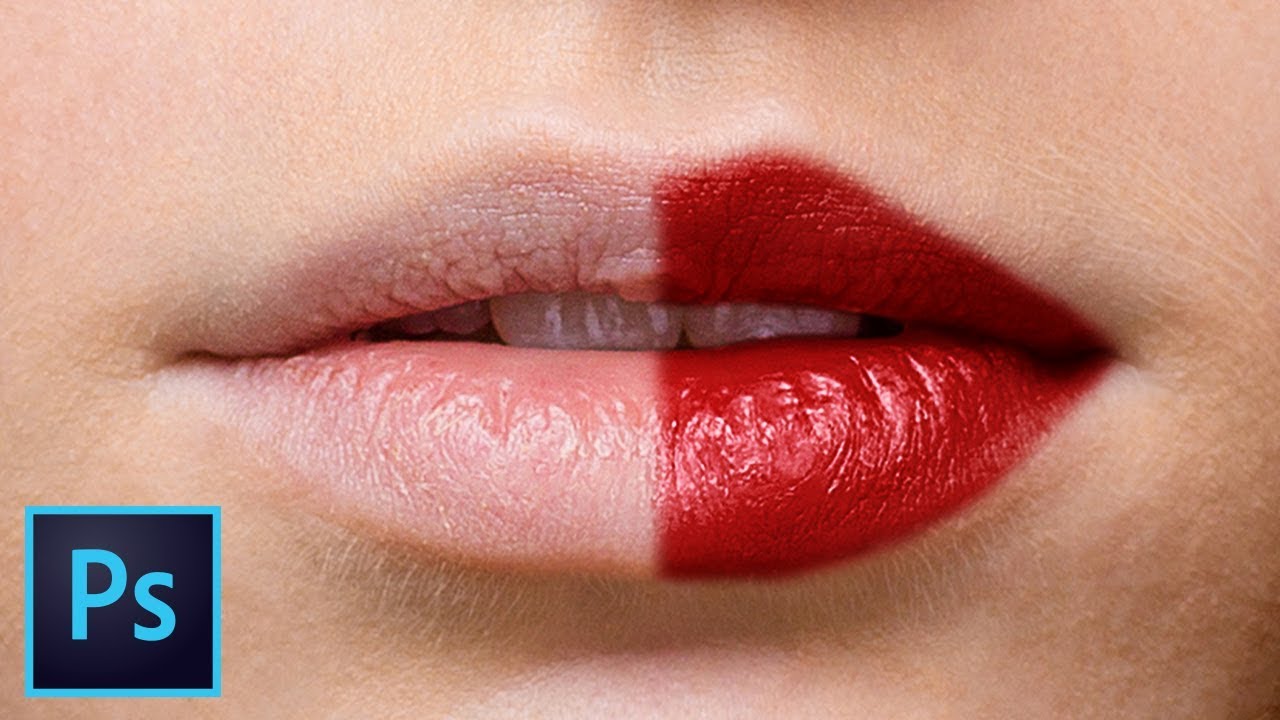
Create Highly Realistic Lipstick in Photoshop
video description
Date: 2022-07-19
Related videos


Comments and reviews: 13
Jason
I've been a follower of PiXimperfect for quite some time now; I often search through the list of tutorials if I cannot find technical solutions online or through Adobe that explain issue resolution from a deep, technical perspective. Professional graphic designers such as myself need to understand every aspect of how things happens, why they happen, the reason they happen the way they do, how to avoid potential issues that impede workflow, and methods of optimizing workflow and efficacy in Photoshop. PiXimperfect almost always offers that, which is why I tune in so much. This tutorial is great, however I must say that it is a big redundant in nature, and the duplicative operations for the lower and upper lips can simply be stated with minor technical adjustment differences due to the larger quantity of highlights on the upper lip. The term more efficient work was used (paraphrased, and I thought to myself, why not simply (1) create a Hue/Saturation adjustment layer and select the colorize option, (2) choose the color or hue that you wish to use as your lip color (3) create a clipping mask, (4) invert the clipping mask, (5) select a soft, small white brush [Hardness=0%/ Opacity=100%/ Flow=20%/ Smoothing=0%], (6) shape around the lips as needed, (7) select a blending mode that works for the image, typically linear light works well for final brighter lipstick colors, or multiply for darker final colors. It may look like more steps to take, but actually they are condensed into one layer that does it all. That's only for a fast, easy solution. His method is excellent for accurate, detailed work that addresses every aspect of the hues, tones, highlights and shadows of the lips (both upper and lower independently. However, for this tutorial, it seemed as if going through the trouble of creating 6 additional layers was overkill unless you're working ONLY on a pic that is solely an image of lips in high resolution. But please, do not misinterpret this commentary. I am a HUGE fan of PiXimperfect and the immense public service to graphic designers that he provides to us all.
reply
I've been a follower of PiXimperfect for quite some time now; I often search through the list of tutorials if I cannot find technical solutions online or through Adobe that explain issue resolution from a deep, technical perspective. Professional graphic designers such as myself need to understand every aspect of how things happens, why they happen, the reason they happen the way they do, how to avoid potential issues that impede workflow, and methods of optimizing workflow and efficacy in Photoshop. PiXimperfect almost always offers that, which is why I tune in so much. This tutorial is great, however I must say that it is a big redundant in nature, and the duplicative operations for the lower and upper lips can simply be stated with minor technical adjustment differences due to the larger quantity of highlights on the upper lip. The term more efficient work was used (paraphrased, and I thought to myself, why not simply (1) create a Hue/Saturation adjustment layer and select the colorize option, (2) choose the color or hue that you wish to use as your lip color (3) create a clipping mask, (4) invert the clipping mask, (5) select a soft, small white brush [Hardness=0%/ Opacity=100%/ Flow=20%/ Smoothing=0%], (6) shape around the lips as needed, (7) select a blending mode that works for the image, typically linear light works well for final brighter lipstick colors, or multiply for darker final colors. It may look like more steps to take, but actually they are condensed into one layer that does it all. That's only for a fast, easy solution. His method is excellent for accurate, detailed work that addresses every aspect of the hues, tones, highlights and shadows of the lips (both upper and lower independently. However, for this tutorial, it seemed as if going through the trouble of creating 6 additional layers was overkill unless you're working ONLY on a pic that is solely an image of lips in high resolution. But please, do not misinterpret this commentary. I am a HUGE fan of PiXimperfect and the immense public service to graphic designers that he provides to us all.
reply
Fran
For me, it was already ok after the first time you played with the underlying layer, and then you kept on perfecting it until you got something that not even a makeup artist could tell if it's real or photoshopped. Your videos are always very useful, and the way you speak and explain everything is charming.
reply
For me, it was already ok after the first time you played with the underlying layer, and then you kept on perfecting it until you got something that not even a makeup artist could tell if it's real or photoshopped. Your videos are always very useful, and the way you speak and explain everything is charming.
reply
Timothy
I can spend 6 years learning from your videos and still not know 10% of what photoshop can do. Thank you for the huge wealth of knowledge and professional videos that you share with us for free. It truly is appreciated!
reply
I can spend 6 years learning from your videos and still not know 10% of what photoshop can do. Thank you for the huge wealth of knowledge and professional videos that you share with us for free. It truly is appreciated!
reply
JazzE
Woooow. Once again I'm late at the game, but this is something I've looked for for a LONG time! Why am I finding it now? Pfft. :P Thank you so much! :D I'm gonna try this in many ways. ohhh, yes. :-3
reply
Woooow. Once again I'm late at the game, but this is something I've looked for for a LONG time! Why am I finding it now? Pfft. :P Thank you so much! :D I'm gonna try this in many ways. ohhh, yes. :-3
reply
Israel
at 8: 55 when you double click to change the color of the layer, I do this but it goes to blending options. How do I change the color of the layer in such a quick way? (I'm using Photoshop CC 2020)
reply
at 8: 55 when you double click to change the color of the layer, I do this but it goes to blending options. How do I change the color of the layer in such a quick way? (I'm using Photoshop CC 2020)
reply
Ordho
Can anyone please help me? I think my paint tool is not working. After selecting the mask I tried to paint the lower lips with both white and black color. But nothing is happening. I don't know why!
reply
Can anyone please help me? I think my paint tool is not working. After selecting the mask I tried to paint the lower lips with both white and black color. But nothing is happening. I don't know why!
reply
Osi
you my friend is the best photoshop tutor ever. So without any further I do I want to say keep it up. Just downloaded your free 3 training materials and they are worth every data I spent. Gracias
reply
you my friend is the best photoshop tutor ever. So without any further I do I want to say keep it up. Just downloaded your free 3 training materials and they are worth every data I spent. Gracias
reply
Carl
Very nice tutorial, thx!
By any chances, do you know how to do the opposite work, I mean, removing lipstick to go back to a natural color lips?
Thank you very much in advance: )
reply
Very nice tutorial, thx!
By any chances, do you know how to do the opposite work, I mean, removing lipstick to go back to a natural color lips?
Thank you very much in advance: )
reply
Tracy
Best tutorial. I came to learn about lips and I learned about colors, bright, saturation, shortcuts, masks, blends. everything!
reply
Best tutorial. I came to learn about lips and I learned about colors, bright, saturation, shortcuts, masks, blends. everything!
reply
Queen
I've been using photoshop for many years but it's the first time I've learned that kind of trick. So love it
reply
I've been using photoshop for many years but it's the first time I've learned that kind of trick. So love it
reply
itech
I am a beginner in photoshop, but damn so lucky to found him. Such an impressive tutorials. Keep it going
reply
I am a beginner in photoshop, but damn so lucky to found him. Such an impressive tutorials. Keep it going
reply
Vishnu
Which is the strongest weapon on Earth? Others: Pen, Bomb, Money etc. Piximperfect fans: BRUSH TOOL.
reply
Which is the strongest weapon on Earth? Others: Pen, Bomb, Money etc. Piximperfect fans: BRUSH TOOL.
reply
The
What I do, I take the photo look at it and then I tell the makeup artist to put on some red lipstick.
reply
What I do, I take the photo look at it and then I tell the makeup artist to put on some red lipstick.
reply
Add a review, comment
Other channel videos