In this video tutorial, we will guide you how to convert access 2000 to access 2010.
For this tutorial, we have already made an access database file using ms access 2000. Follow this step by step guide to update your version.
Step 1 -- Open Ms Access
Follow this step by step guide to learn how to convert access 2000 database into access 2010. First of all let's open up Microsoft Access.
Step 2 -- Open database
With that done, let's click on the open option and in the browsing window, open up the database file.
Step 3 -- Save & Publish
Now that the database file has opened up in access 2010, let's move to the file menu and click on the Save & Publish button.
Step 4 -- Database file type option
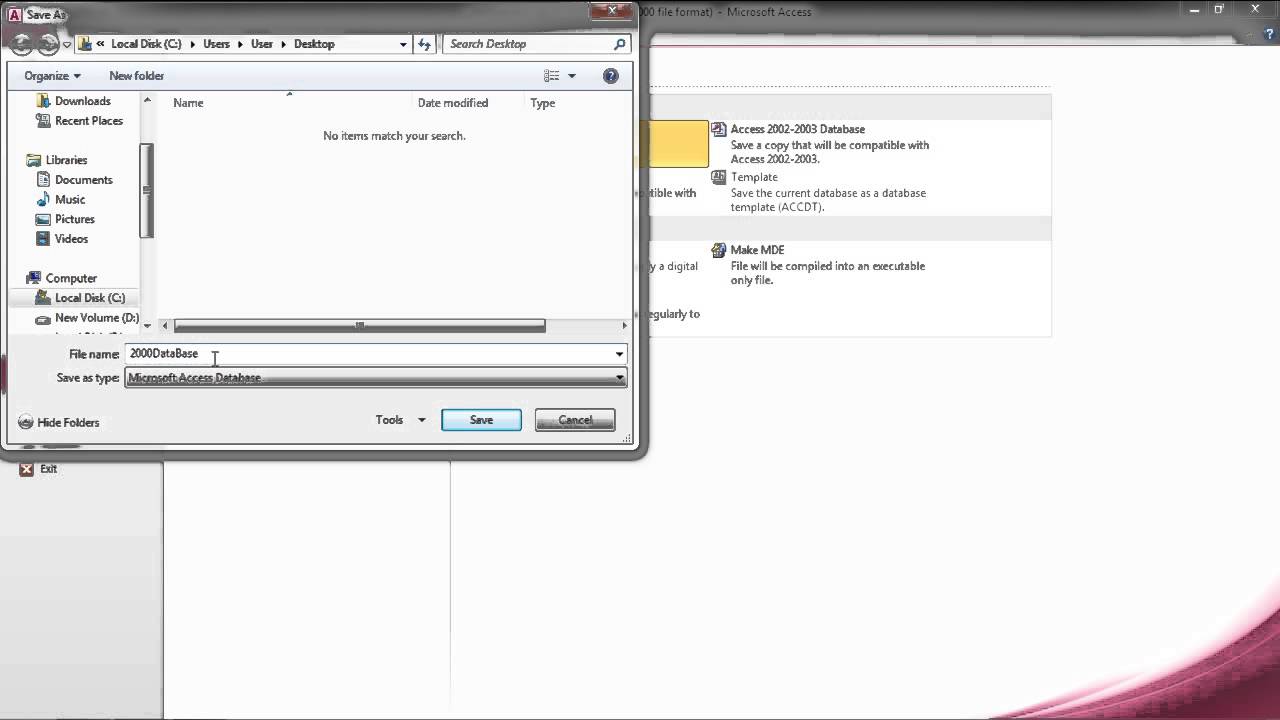
Here in the pane towards the right side, you will see the Database File Type option. Open up the drop down menu and over there, select the Access Database option. With that done, you can click on the save as button and a new window will open up.
Step 5 -- Save the new file
Over there, let's name the file and click on the save button.
Step 6 -- Database upgraded
With that done, it will prompt you that the this database has been upgraded to the Access 2007 file format and cannot be shared with users who have 2003 or earlier versions installed. This means that the ms access 2000 format has been converted to access 2010. In this manner, you can convert a database to access 2010 Date: 2023-07-08