In this video tutorial we will show you how to use section breaks in Word.
Dividing a document into sections in Word can be a useful as it will allow you to apply different formatting options to different parts of the document. This tutorial will show you how to do section breaks Word.
Step # 1 -- Locating the Section Breaks Area
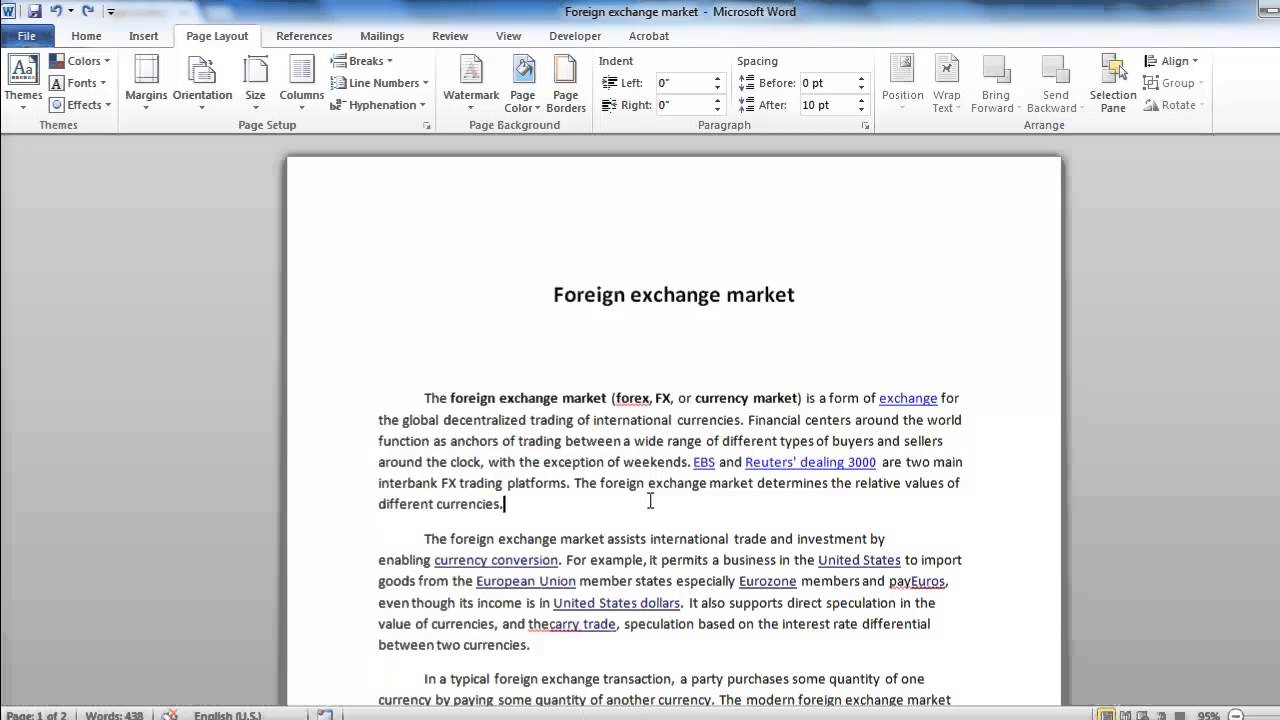
Open the Word document that you want to add sections breaks to, as you can see here we have a document of a few pages in length. In the ribbon click on the Page Layout tab and you will see a group called Page Setup, the button we are interested in is Breaks and when you click on this you can see the Section Breaks options at the bottom.
Step # 2 -- Creating a Section Break
Now, click onto the document where you want to insert a section break. Here we are just going to insert one after a paragraph on the first page of text so we are placing the cursor there. Click Breaks and click Next Page, this will create a break in the text, much like a page break, but it will also end the section of the document meaning that the text either side of this break can have different formatting, such as margins or columns.
Step # 3 -- The Other Section Breaks
The Next Page section break is just one of the section options. Click to the end of another paragraph and from the Breaks menu click Continuous - as you can see this creates a break in the middle of a page without creating a new page. In order to see where the breaks are in your document, go to the Home tab and click on the Show/Hide icon. This will show you where you section breaks are and also what type they are. And that is how to do section breaks Word Date: 2023-07-08
George Thanks. I needed section breaks only a few times since I quit Windos XP and struggled to find the feature in newer versions, when I suddenly had to break the text into two sections.
reply
Halcyon I am using endnotes. I need to add a section break after the end notes, but the breaks option is inactive. If I go to another place in the document I can make a section break. reply