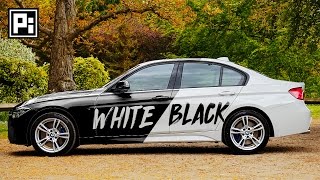
How to Change Color of an Object from White to Black and Vice-Versa in Photoshop
video description
Date: 2022-07-19
Related videos


Comments and reviews: 20
Wabbitstewed
THANK YOU SO MUCH for making this video. Im assuming youre using CS6? The object Im trying to make all black is going to be a photo manipulation of my dog. My husky mix, Strider, is almost entirely white with a black mask. Without a tablet, I feel so limited as far as what artistic projects I can do. I thought of just sketching and scanning but chances are I would have too much to doctor and go blind trying. Using a mouse to do really intricate work is a nightmare I dont need so Ill take any shortcuts I can get.
I havent been able to figure out how to change his white areas to black and maintain the texture of his fur, which I later plan to highlight with a sort of sheen/glossiness (like an almost iridescent sheen that blackbird feathers have. His eyes, Id like to color red and add a glowing effect. He has heterochromia (two different colored eyes) so I would probably want to make both eyes as light and close to the same shade as possible before making them red. I assume. I am used to CS3 lol and its been a long time since Ive meddled with digital editing. Would I use the same methods for the extra details mentioned (not just selecting and changing white to black) or would I need to do something more complicated?
reply
THANK YOU SO MUCH for making this video. Im assuming youre using CS6? The object Im trying to make all black is going to be a photo manipulation of my dog. My husky mix, Strider, is almost entirely white with a black mask. Without a tablet, I feel so limited as far as what artistic projects I can do. I thought of just sketching and scanning but chances are I would have too much to doctor and go blind trying. Using a mouse to do really intricate work is a nightmare I dont need so Ill take any shortcuts I can get.
I havent been able to figure out how to change his white areas to black and maintain the texture of his fur, which I later plan to highlight with a sort of sheen/glossiness (like an almost iridescent sheen that blackbird feathers have. His eyes, Id like to color red and add a glowing effect. He has heterochromia (two different colored eyes) so I would probably want to make both eyes as light and close to the same shade as possible before making them red. I assume. I am used to CS3 lol and its been a long time since Ive meddled with digital editing. Would I use the same methods for the extra details mentioned (not just selecting and changing white to black) or would I need to do something more complicated?
reply
Jonas
Don't do the dirty blend if-trick to recover details the darkest shadows like he's showing (it ends up with inverted unnatural shadows. Just do a better Curves adjustment. He is just moving in the black point and clipping everything to solid black - that is very bad as you are throwing away all those details (might as well have been using Levels. Make it more gradual towards the shadows so it doesn't clip so suddenly!
reply
Don't do the dirty blend if-trick to recover details the darkest shadows like he's showing (it ends up with inverted unnatural shadows. Just do a better Curves adjustment. He is just moving in the black point and clipping everything to solid black - that is very bad as you are throwing away all those details (might as well have been using Levels. Make it more gradual towards the shadows so it doesn't clip so suddenly!
reply
Daniel
Question: Anyone know why I don't see Select and Mask when I use same selection tool as he does in this video. It shows everything but that? Anyone know how to get that to show up on the menu bar? I've already checked the Select menu bar for Select and Mask, but it's not even there in the drop down menu at all? This is literally a useless good tutorial if I can't get that. I am using PS CS6 Extended. Thanks
reply
Question: Anyone know why I don't see Select and Mask when I use same selection tool as he does in this video. It shows everything but that? Anyone know how to get that to show up on the menu bar? I've already checked the Select menu bar for Select and Mask, but it's not even there in the drop down menu at all? This is literally a useless good tutorial if I can't get that. I am using PS CS6 Extended. Thanks
reply
Ashika
hey. i have a problem with my photoshop.
whenever i open a colour photo it gets converted into a black a white photo. and i am not able to change it. but if i directly open the image it remains the same(colour image. But if i open it in some saved sheet it opens like a black and white pic.
what do i do for this.
reply
hey. i have a problem with my photoshop.
whenever i open a colour photo it gets converted into a black a white photo. and i am not able to change it. but if i directly open the image it remains the same(colour image. But if i open it in some saved sheet it opens like a black and white pic.
what do i do for this.
reply
Melvyn
I am watching your videos on holiday in Corfu, and I have learned so many things that I have struggled with before - and didn't know that they were even possible. Thank you SO much - I can't wait to get back home and try these out on my PC. You are an amazing teacher - where are you based? In Goa?
reply
I am watching your videos on holiday in Corfu, and I have learned so many things that I have struggled with before - and didn't know that they were even possible. Thank you SO much - I can't wait to get back home and try these out on my PC. You are an amazing teacher - where are you based? In Goa?
reply
isaiah
What colors makes straight black and straight white? Or pure. Some body tell me something About the dark colors of darkness and the light. Every body think they know! But to me black is not darkness because their are many colors that makes up the darkness. And white is not light.
reply
What colors makes straight black and straight white? Or pure. Some body tell me something About the dark colors of darkness and the light. Every body think they know! But to me black is not darkness because their are many colors that makes up the darkness. And white is not light.
reply
KAZ
For the gods' sakes, stop gasping when you inhale!
This is a basic audio recording principle, you must inhale inaudibly.
Try opening your mouth wider to inhale, when you're off-screen nobody will notice.
reply
For the gods' sakes, stop gasping when you inhale!
This is a basic audio recording principle, you must inhale inaudibly.
Try opening your mouth wider to inhale, when you're off-screen nobody will notice.
reply
RefleX
If anyone is bored enough to help me,
I own a black vehicle and I really suck with PS.
If i could add anyone on FB or something that would like to explain or do it for me,
I would really be happy
reply
If anyone is bored enough to help me,
I own a black vehicle and I really suck with PS.
If i could add anyone on FB or something that would like to explain or do it for me,
I would really be happy
reply
TruthSeeker_NC
Oh man you saved the day! I have looked at several videos showing how to turn a black object to white and nothing worked. I followed your tutorial and BAM! Thank you SO much. I LOVE your videos. :)
reply
Oh man you saved the day! I have looked at several videos showing how to turn a black object to white and nothing worked. I followed your tutorial and BAM! Thank you SO much. I LOVE your videos. :)
reply
cosmo
hi, i tried this i turned one of 2 cups black, however i found that i got better results by moving the curves adjustment on your top right down thank u. p. s. i am working with gimp but should not matter
reply
hi, i tried this i turned one of 2 cups black, however i found that i got better results by moving the curves adjustment on your top right down thank u. p. s. i am working with gimp but should not matter
reply
Farhan
The best thing about your video is you tell us lots of other shortcuts any many other basic things. And the way you work is awesome. Keep going. Thanks for the tutorial.
reply
The best thing about your video is you tell us lots of other shortcuts any many other basic things. And the way you work is awesome. Keep going. Thanks for the tutorial.
reply
mohamad
your tutorial is amazing i looked around for half an hour going through several confusing or out of date videos till i found yours. it was clear and to the point.
reply
your tutorial is amazing i looked around for half an hour going through several confusing or out of date videos till i found yours. it was clear and to the point.
reply
Anthony
ah can always rely on you. i need something i search eg white to black and boom im sorted so change a shirt from white to black on a portrait
reply
ah can always rely on you. i need something i search eg white to black and boom im sorted so change a shirt from white to black on a portrait
reply
Paco
You got sub from me, I mostly don't watch Indian ppl making tutorials because most of them just suck (no offense) but you are on point, thanks!
reply
You got sub from me, I mostly don't watch Indian ppl making tutorials because most of them just suck (no offense) but you are on point, thanks!
reply
DJ
When i pulled the slider over to make it black it turned into a nasty navy blue black and it covered the picture like an overlay. what do I do?
reply
When i pulled the slider over to make it black it turned into a nasty navy blue black and it covered the picture like an overlay. what do I do?
reply
Darwin
Fantastic video. Great pace and super informative. I just discovered your PS tutorials and they're the best on here for sure.
reply
Fantastic video. Great pace and super informative. I just discovered your PS tutorials and they're the best on here for sure.
reply
RajTech
I was dying because of your microphone. I literally felt dying because all of the breathing and extra sound. Not worth it.
reply
I was dying because of your microphone. I literally felt dying because all of the breathing and extra sound. Not worth it.
reply
Dan
I wanted to change a white car to grey, however the car isn't 100% white, its more of a vage beige. Any chance you can try it?
reply
I wanted to change a white car to grey, however the car isn't 100% white, its more of a vage beige. Any chance you can try it?
reply
Laban
Thanks for the video it really helped me a lot. This is very useful for when I can't find the right vehicle colour.
reply
Thanks for the video it really helped me a lot. This is very useful for when I can't find the right vehicle colour.
reply
Choudhary
Hey bro, Can you tell me? How to change wood cabinets colors in any other colors like white, brown and black?
reply
Hey bro, Can you tell me? How to change wood cabinets colors in any other colors like white, brown and black?
reply
Add a review, comment
Other channel videos